Insta Pro 3 APK Download v15.70 for Android (InstaPro3)
App Name
Insta Pro 3 (InstaPro3)
Category
Social
Updated Version
v15.70
App Size
149 Mb
Price
Free
Released
Jan 2022
Developer
SamMods
Root Required
No
CPU Architecture
ARM64-v8a
Require
9.0+
What is Insta Pro 3 APK?
Ever wanted to save an Instagram video, hide your “Seen” status on messages, or just scroll without seeing endless ads? The standard app doesn’t let you do this, which is why so many Android users switch to Insta Pro 3 APK. It looks and feels exactly like the normal Instagram, but it’s a modified version that gives you the control you’ve been missing.
Also written as InstaPro3 and sometimes called Instagram Pro 3, it shows up on your phone as InstaPro3 ♕. It comes packed with built-in tools for direct media downloading, blocking of sponsored posts, and anonymous story viewing. If you want a better and more private social media experience, keep reading. Below, we’ll cover its main features and show you how to install it and what to check first.
Key Features of The App
Media Download
Save photos, videos, reels and stories to your phone with one tap. Everything you save is listed in Download History in the app menu. No screen recording, no third-party tools just download and keep what you love.
Anonymous Story View
Watch stories without appearing in the viewer list, once you turn on Hide view Stories in Privacy settings (it’s off by default). Browse updates quietly and on your own terms.
Hide Typing Indicator
Take your time replying to messages. The other person won’t see the “typing…” notice while you write. Turn on Hide typing status in DM under Privacy settings.
Full-Size Profile Picture
Tap any profile photo to view or download it in full size something the official app simply doesn’t allow.
Ad-Free Browsing
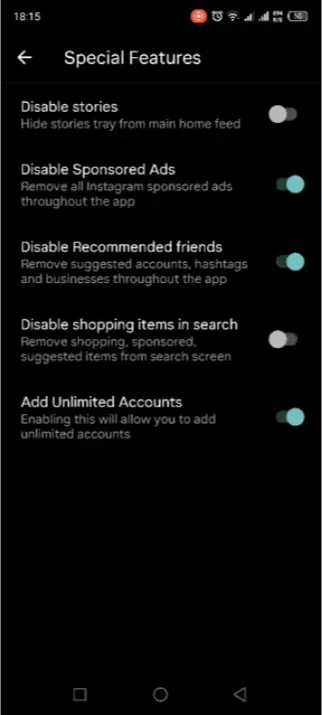
Turn on Disable Sponsored Ads in Special Features to remove sponsored posts from your feed and stories.
Multiple Account Support
Turn on Add Unlimited Accounts in Special Features to add more accounts than the usual limit and switch between them.
Themes & Customization
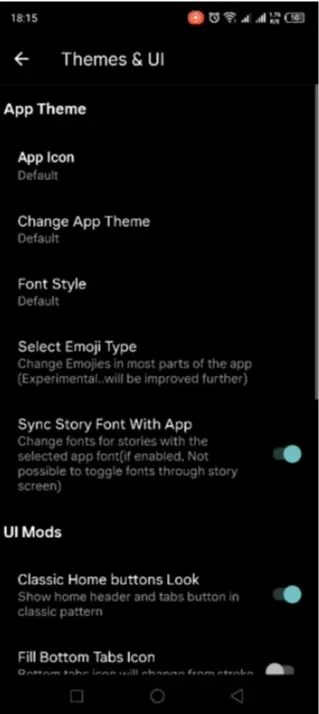
Change colors, fonts, and themes to make the app truly feel like yours.
App Lock & Privacy Controls
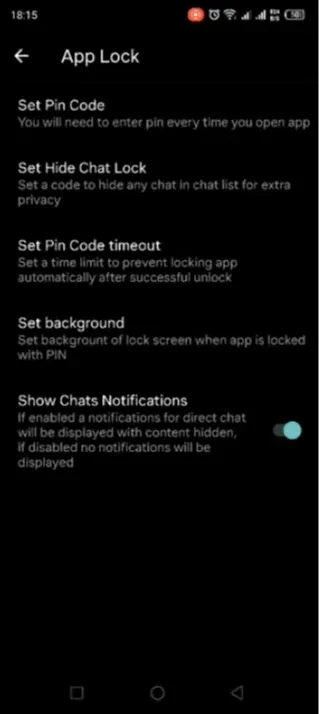
Protect your direct messages with a built-in lock and decide exactly who sees your activity.
Insta Pro 3 screenshots
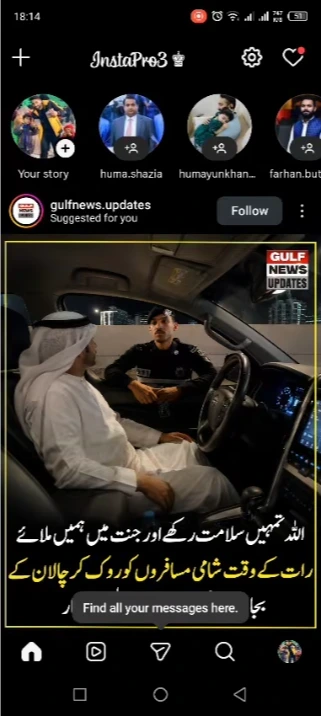
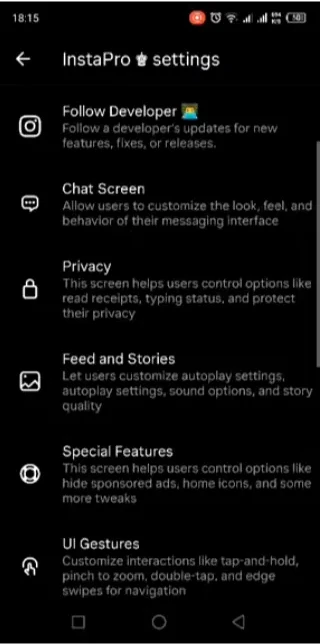
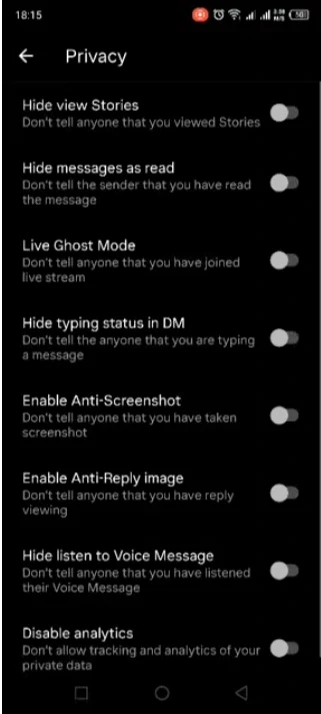
These are my own screenshots from the app on an Android phone, not promo images.
Settings worth turning on (most are off by default)
The biggest surprise for new users: almost none of the privacy features work until you switch them on. Open the gear icon on the home screen, then InstaPro settings. Here is what each screen actually contains.
- Privacy: hide that you viewed a story, hide read receipts, Live Ghost Mode (watch a live stream without appearing), hide typing status, stop the “screenshot taken” notice, hide that you replayed a photo, hide that you listened to a voice message, and a “Disable analytics” switch. All of these were off when I opened the app.
- Special Features: remove sponsored posts, remove suggested accounts and businesses, hide the stories tray, hide shopping items in search, and add more than the usual number of accounts.
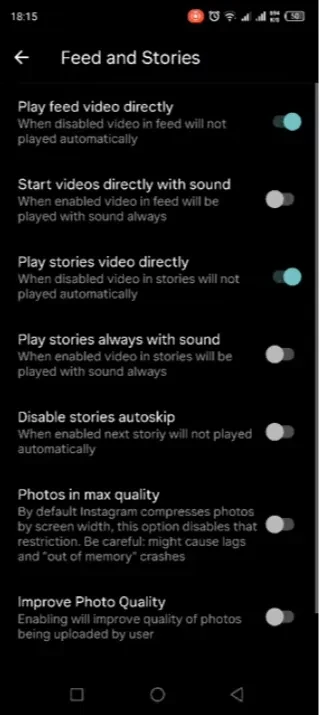
- Feed and Stories: stop videos from autoplaying or playing with sound, stop stories from skipping ahead, and load photos in maximum quality (the app warns this can use more memory).
- Chat Screen: set a chat background colour or image, and hide the audio call, video call, translator and other buttons in chats.
- App Lock: a PIN for the whole app, a separate code to hide individual chats, a timeout so you aren’t asked for the PIN every time, and hidden-content chat notifications.
- UI Gestures: zoom a photo by long-pressing it, pinch to zoom reels, tap a reel to mute instead of pause, and turn off double-tap to like on posts, comments, reels or messages.
- Themes & UI: change the app icon, colour theme, font and emoji style. Most changes need an app restart, and the app asks you to restart.
- Home menu: the gear icon also opens Download History, Favorite Pages, Video Splitter and Activity History.
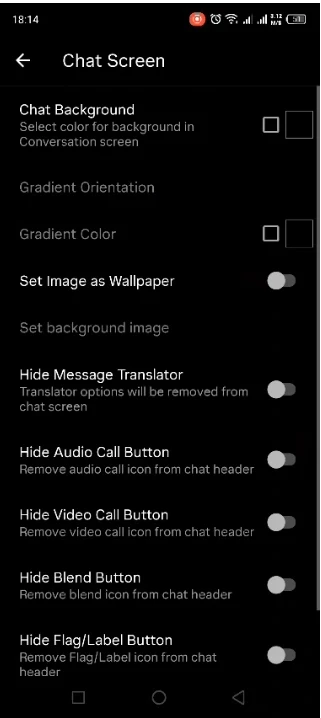
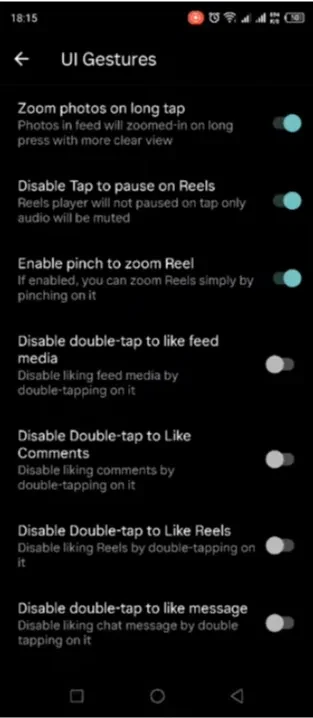
One more thing you’ll see on first launch: a popup asking for All files access. The app needs it to save stories, view-once media and profile photos and to use custom fonts or chat backgrounds. You can tap Cancel; downloads that need it simply won’t work until you allow it.
How to Download Insta Pro 3
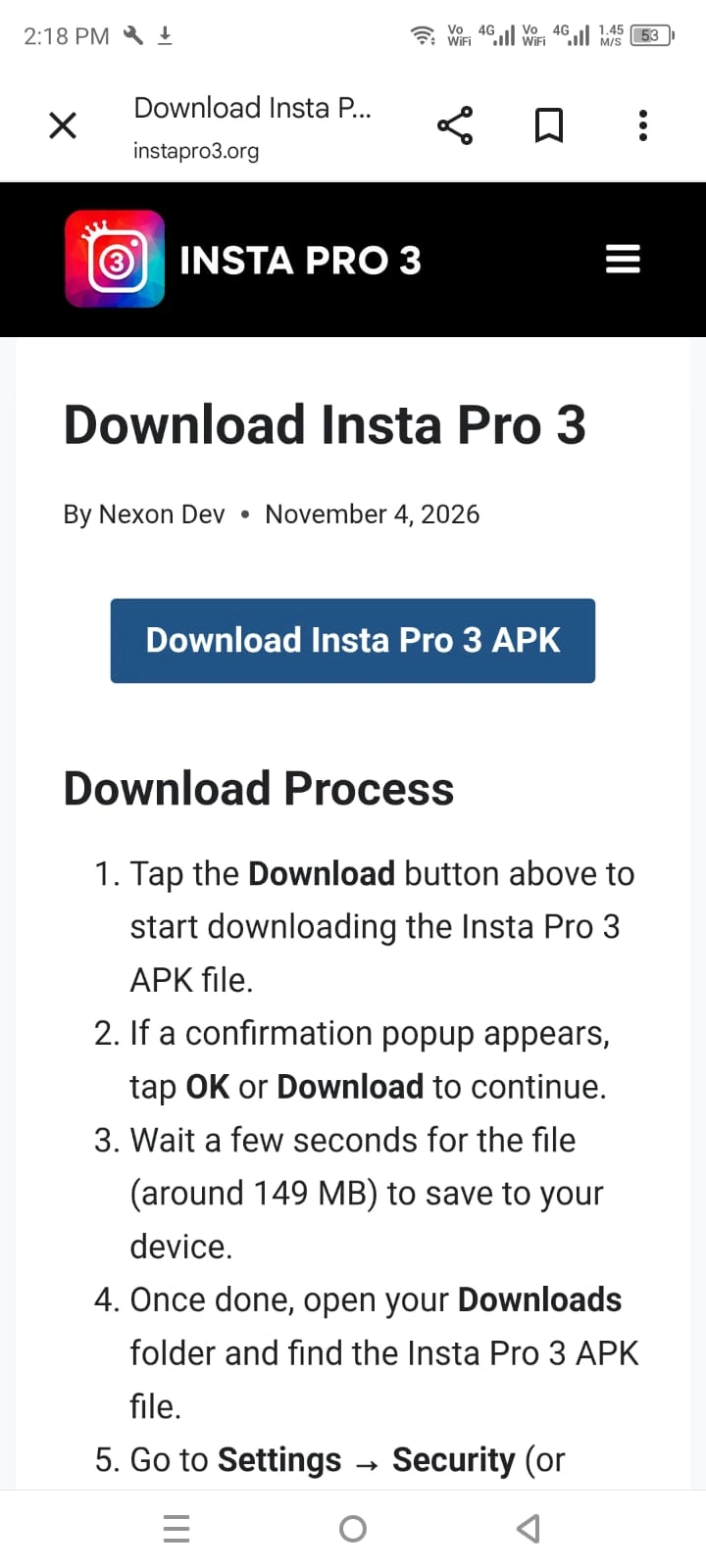
Downloading and installing Insta Pro 3 is quick, free, and only takes a couple of minutes. Since it isn’t available on the Google Play Store, you will need to download the APK file directly from our website. Just follow these simple steps on your Android phone:
- Click the Download button at the top of this page.
- A confirmation prompt may appear tap OK or Download to continue.
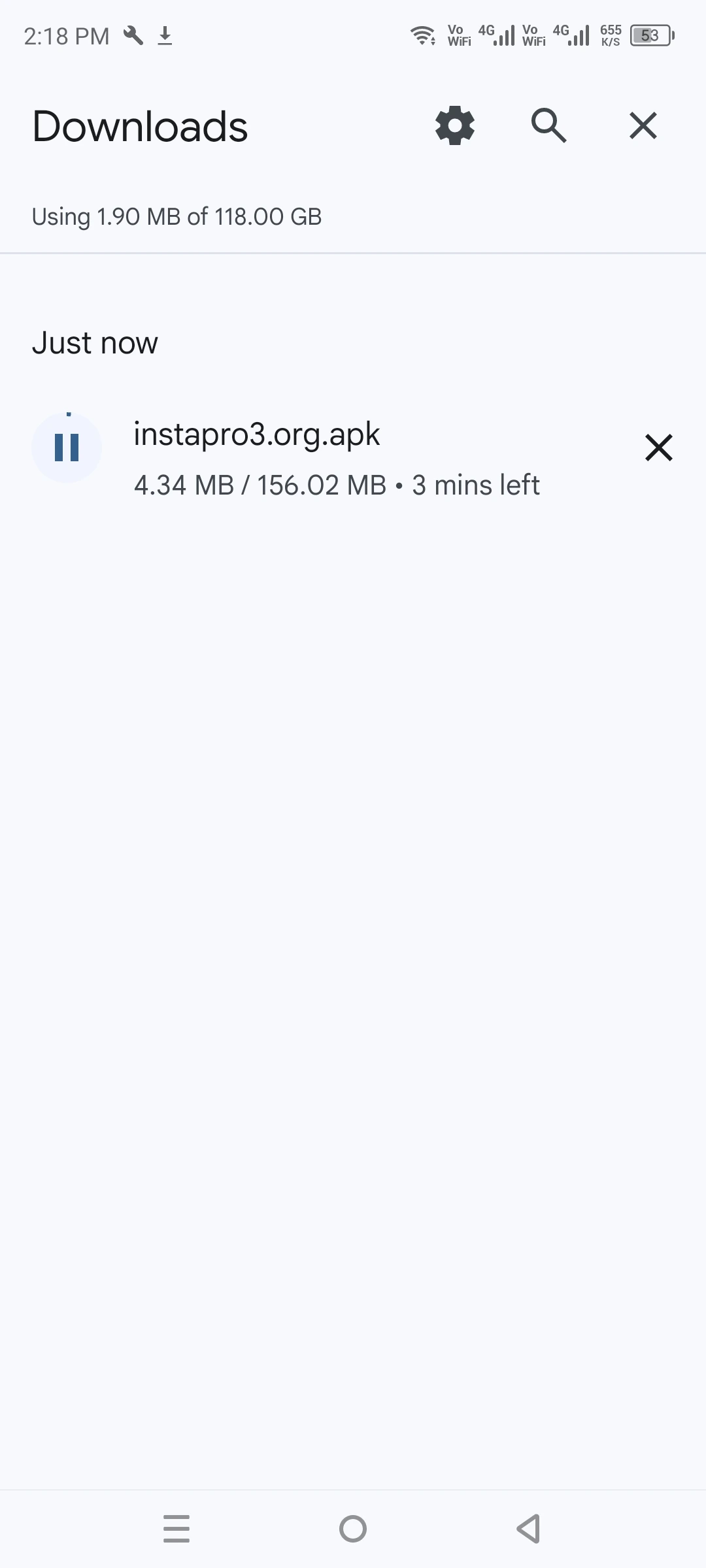
- Wait a few seconds while the APK file saves to your device.
- Once finished, open your Downloads folder and locate the Insta Pro 3 APK file.
- Tap the APK. On Android 8 and newer, your phone asks to allow installs from your browser or file manager: tap Settings and turn on Allow from this source.
- Go back. On older phones the same switch is under Settings → Security → Unknown sources.
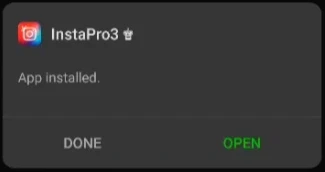
- Open the downloaded APK file and tap Install.
- Wait for the setup to finish, then open the app.
- Log in with your Instagram account and start exploring all the extra features.
Once the installation is complete, you can instantly enjoy media downloads, private viewing, custom themes, and everything else this application has to offer all in just a few minutes.
Insta Pro 3 vs Official Instagram
Feature
Insta Pro 3
Media Download
Hide Seen Status
Ad-Free Browsing
Available on Play Store
Theme Customization
Pros & Cons
Pros
- Free to download and use
- Download photos, videos, reels, and stories
- Strong privacy controls
- Ad-free, customizable interface
- Multiple account support
Cons
- Not available on the Google Play Store
- Requires manual updates
- Account safety isn’t 100% guaranteed
Check the file before you install
- Hash: compare your file’s SHA-256 with the one on the File Verification page. If it matches, you have exactly the file I checked.
- Play Protect: let Google Play Protect scan the APK. If it says the app is harmful, don’t install it.
- VirusTotal: search the hash on VirusTotal and read the detection names. Mods are sometimes flagged as “riskware” because they modify another company’s app.
These checks lower the risk, but none of them can prove a modified app is harmless. Insta Pro 3 is unofficial and not approved by Meta, and using it can get an Instagram account restricted, so try it with a secondary account rather than your main profile.
My Personal Experience with Insta Pro 3
I test Insta Pro 3 on an Infinix Note 12 with a secondary Instagram account, never my main one. The features I use most are the one-tap downloader for reels and stories and hiding my seen status, and the feed has no sponsored posts. Because it is a third-party mod, I review its permissions after every update and deny the ones I don’t need. The full routine is on the How I Test page.
Common Insta Pro 3 problems and how to fix them
These are the problems people mention most often in comment sections and forums about Instagram mods, plus what the official Android and Instagram help pages say about them. Each fix starts with the cause, because the cause tells you whether the problem is on your phone, in the file, or on Instagram’s side. Last checked: November 2026.
1. “App not installed” when you tap the APK
Why it happens: Android refuses to install an app over another copy that has the same package name but was signed differently. That is usually an older Insta Pro 3 you got from a different website. A half-finished download or a full phone causes the same message.
- Go to Settings → Apps and look for any existing Insta Pro 3. If it is there, uninstall it. Your Instagram account is not affected; only the app’s local settings are removed.
- Make sure you have at least 500 MB free. The app itself is around 150 MB, and Android needs extra space while it installs.
- Compare the downloaded file’s size with the size shown in the info box at the top of this page. If it is smaller, the download broke. Delete it and download again on Wi-Fi.
- Install again from your file manager, not from a browser notification that may point to the old file.
2. Google Play Protect shows a warning or blocks the install
Why it happens: Play Protect checks apps installed from outside Google Play. According to Google’s Play Protect help page, it can warn you, disable an app, or remove it if it considers the app potentially harmful. A modified Instagram client is exactly the kind of app it looks at closely.
- If the warning offers Scan app, use it. It sends the app to Google for a check and gives you a result before you decide.
- Read the warning text. “Unverified” or “built for an older version of Android” is different from “harmful app blocked”. If Play Protect says an app is harmful, do not install it.
- Do not switch Play Protect off for good just to get one app installed. It protects every other app on your phone too.
3. New in 2026: “App from unverified developer”
Google is changing how sideloading works. Apps now need to come from a registered developer to install the normal way on certified Android phones. As Android Authority’s timeline explains, enforcement started on September 30, 2026 in Brazil, Indonesia, Singapore and Thailand, and Google plans to expand it worldwide in 2027.
If you live in one of those countries and see this message, Google’s official steps for unverified apps are: turn on Developer options, then go to Settings → System → Developer options → “Allow apps from unverified developers”. The first time, Android makes you wait 24 hours as a security delay. After that, you tap “Install anyway” on each warning. Developers can also install apps over ADB from a computer. In other countries, nothing changes yet.
4. Login fails, the screen goes black, or the security code loops
Why it happens: To Instagram, a login from a modified app looks like a new, unknown device. It often asks you to confirm it’s you, and the confirmation sometimes only appears in the official app or by email.
- Open the official Instagram app or your email and look for a “Was this you?” prompt. Confirm it, then try logging in to Insta Pro 3 again.
- Turn off any VPN and stay on one network while you log in. Jumping between countries looks suspicious.
- Log in with one account at a time. Users on mod forums report that adding several accounts in quick succession triggers security checks and forced password resets.
- If you are stuck after several tries, wait a few hours. Repeated failed logins make Instagram stricter, not more relaxed.
5. “We suspect automated behavior” or “Action blocked”
Why it happens: Instagram limits activity that looks like a bot, such as saving lots of posts quickly or viewing many profiles in a short time. Its help page on accounts restricted for data scraping makes clear that collecting information in unauthorized ways can get an account restricted.
- Slow down. Avoid bulk-downloading stories or reels one after another.
- Remove any follower, like or analytics apps you have connected. Instagram lists them under Apps and websites in your settings.
- Check Account Status in the official app to see if any restriction is active and when it ends.
6. Your account got suspended or disabled
This is the real risk of any Instagram mod. Instagram’s Terms of Use do not allow accessing the service through unauthorized apps or modifying its products, so using Insta Pro 3 can lead to a suspension. Nobody outside Instagram, including this site and the app’s developer, can lift it.
- Stop using the mod on that account straight away.
- Use the official app or website to request a review, following Instagram’s page on disabled accounts. Appeals have a time limit, so do it soon.
- Ignore anyone who offers to “unban” your account for money. Those offers are a common scam.
7. The app keeps asking you to update, or stops loading the feed
Why it happens: Every Insta Pro 3 release is built on a specific Instagram version. When Instagram retires that version on its servers, older builds start showing update prompts, empty feeds or “Couldn’t refresh feed” errors. People who stay on old builds report prompts that never go away.
Fix: Install the newest version from this page over the existing one. If Android says “App not installed”, see problem 1. Old versions are only useful for a short time after a new release breaks something.
8. Can I keep the official Instagram app too?
Yes. Insta Pro 3 is built as a separate clone with its own package name, so it installs next to the official app instead of replacing it. Many people keep the official app for their main account and try the mod with a second account. That’s also the safest way to try it.
9. Is my password safe?
When you log in, you are typing your Instagram password into an app that Meta did not make and that no one can fully audit. Google’s own Android help page warns that apps from unknown sources can put your device and personal information at risk. To limit the damage if something goes wrong:
- Use a password you don’t use anywhere else.
- Turn on two-factor authentication with an authentication app, so a stolen password alone is not enough.
- Check “Where you’re logged in” in the official app from time to time, and log out any device you don’t recognise.
- If you stop using Insta Pro 3, log out of it, uninstall it, and change your password.
Still stuck? Email support@instapro3.org with your phone model, Android version and the exact error text. Never include your password or login codes.
Conclusion
Insta Pro 3 APK is a powerful, user-friendly way to get more out of Instagram from media downloads and privacy controls to a cleaner, customizable interface. It isn’t an official app, so a little caution goes a long way, but for users who want extra features and full control, it’s one of the most complete options available in 2026.
FAQs

finally i can zoom profile pics easily

app is cool but takes time to start

theme store is awesome

thanks for the quick updates instapro3 team


Nexon Dev
Nexon Dev is a tech enthusiast with over five years of experience in Android development and mobile technology. As the creator of instapro3.org, he shares clear guides, feature updates, and safety-focused APK information to help users explore modified apps with confidence.